Key Takeaways
- Cloud Data Migration moves enterprise data from legacy systems, on-premises databases, or older platforms into cloud environments while preserving accuracy, usability, and governance.
- A cloud migration strategy should define workload scope, target architecture, migration waves, validation controls, security requirements, and cutover readiness.
- Cloud database migration requires more than copying tables. It must account for schema changes, performance behavior, access models, lineage, data quality, and downstream consumers.
- Legacy cloud migration often involves reworking outdated data structures, archived records, batch jobs, integrations, and reporting dependencies before modernization succeeds.
- Enterprise cloud migration requires migration monitoring, reconciliation, rollback planning, audit trails, and post-migration validation.
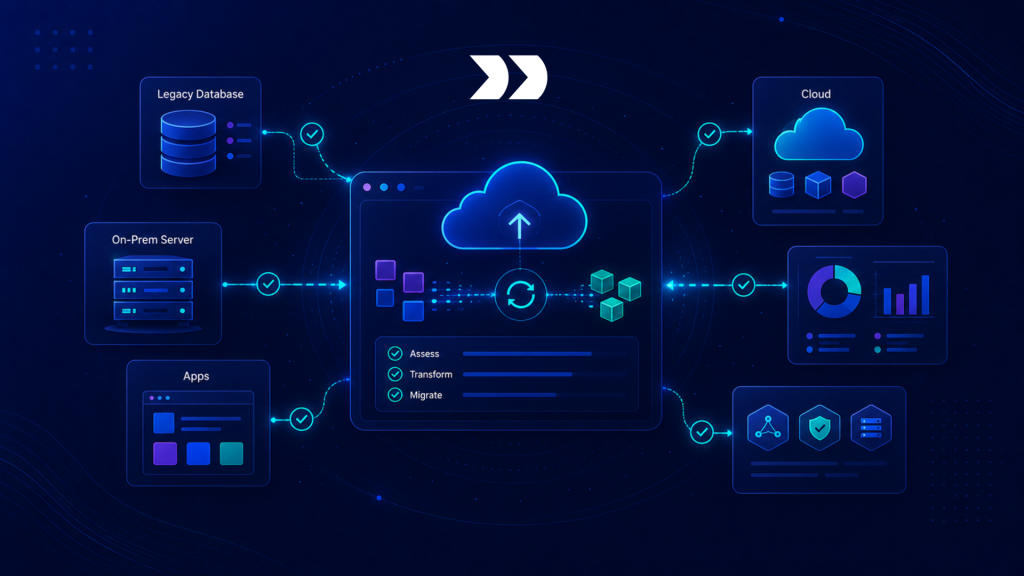
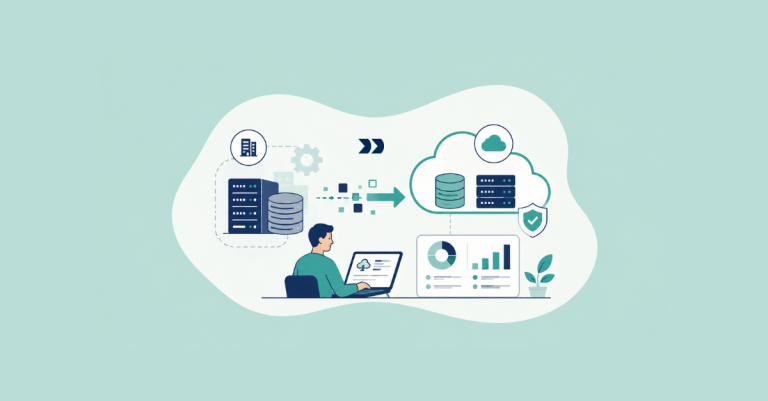
Cloud Data Migration is often treated as a platform move. Data leaves an on-premises database, legacy application, or older warehouse and lands in a cloud platform. However, enterprise migration programs rarely succeed through transfer alone. The harder work is preserving business meaning, access control, reporting accuracy, historical continuity, and downstream process reliability after the data reaches the cloud.
A cloud migration program may involve ERP records, CRM data, finance tables, product catalogs, customer histories, healthcare records, support tickets, operational logs, and analytical models. Each domain carries its own structure, owner, validation rules, and retention expectations.
In enterprise modernization, Cloud Data Migration is not only infrastructure relocation. It is a controlled transition from legacy data environments into cloud operating models.
Why Cloud Data Migration Matters in Enterprise Modernization
Cloud Data Migration matters because enterprise modernization increasingly depends on scalable platforms for analytics, AI workflows, reporting, data sharing, and operational coordination. Yet migration can also expose legacy complexity that was hidden inside old systems.
Deloitte’s enterprise data strategy and architecture guidance notes that organizations face data sprawl and need well-governed, integrated platforms to scale business value. Cloud migration programs must therefore address governance and architecture, not only infrastructure movement. Enterprise system modernization strategies are essential for organizations looking to streamline operations and enhance data utilization. By implementing these strategies, companies can significantly reduce the risk associated with legacy systems while leveraging advanced technologies. Additionally, a focus on modernization helps in fostering a culture of innovation that aligns with current market demands.
Why Cloud Migration Is Not Simple Data Transfer
A cloud migration does not automatically modernize data. Legacy tables may contain duplicates, invalid codes, undocumented relationships, missing identifiers, or historical workarounds. If these issues move unchanged into the cloud, the new platform inherits old instability.
Cloud environments also introduce new design considerations. Storage layers, compute models, access controls, data sharing, transformation patterns, cost visibility, and downstream consumption can differ significantly from legacy platforms.
Therefore, migration teams must evaluate how data should be structured, validated, secured, and consumed after migration. A table-to-table copy may move data, but it may not create a reliable cloud foundation.
How Weak Cloud Migration Creates Operational Risk
Weak cloud migration creates risk when data lands in the cloud without sufficient validation, lineage, security, or readiness control. Reports may produce different results. Downstream applications may fail because identifiers changed. Access rules may become too broad. Historical data may lose context. Batch jobs may break because cloud timing and storage behavior differ from the legacy environment.
Gartner’s 2025 data and analytics trends highlight that data and analytics are becoming more embedded across enterprise operations. As cloud platforms become central to those operations, migration accuracy becomes a business continuity issue rather than a back-office technical task.
Cloud Migration Strategy for Enterprise Data
A cloud migration strategy defines how data will move, what will change, what must be validated, and how business continuity will be protected. The strategy should cover data domains, target architecture, migration waves, security controls, cost visibility, downstream dependencies, and rollback planning.
The strategy should be created before migration execution. If migration teams discover target design decisions during loading, rework and cutover risk increases.
Defining Scope, Waves, and Migration Priority
Enterprise cloud migration should be scoped by data domain, system dependency, business criticality, and target readiness. Not every dataset should move at the same time. High-risk data such as finance, customer, healthcare, product, and operational records should have stronger migration controls than low-risk historical archives.
Migration waves reduce risk. A team may start with reference data, then migrate historical records, then active operational records, then real-time feeds or downstream reporting dependencies. Each wave should have validation gates before the next wave begins.
A strong migration sequence prevents teams from loading critical data into an unproven cloud foundation. Data migration strategies in ERP can significantly impact the overall success of the cloud transition. Implementing a well-planned migration approach ensures that all essential data is accurately transferred and integrated. By prioritizing critical data elements, organizations can enhance system performance and reliability during the transition period.
Choosing Target Cloud Architecture
Cloud architecture affects migration design. Data may land in Snowflake, BigQuery, Databricks, cloud object storage, managed relational databases, lakehouse environments, or cloud-native analytical platforms. Each target has different behavior around schema enforcement, partitioning, security, compute, scaling, metadata, and cost.
A cloud migration strategy should define target zones, storage formats, access patterns, transformation logic, lineage capture, and monitoring standards. It should also clarify whether the migration is lift-and-shift, re-platforming, re-architecture, or modernization-led.
Deloitte’s data modernization and migration guidance describes migration and modernization as connected to cloud data platform architecture, modeling, governance, and scalable analytics. That framing is important because cloud migration should support the future operating model, not only the target platform.
Planning Security, Access, and Governance Controls
Security and governance should be designed before data lands in the cloud. This includes role-based access, service accounts, encryption, network controls, sensitive-field handling, data retention, audit logging, and cross-border data considerations.
Cloud migration can accidentally widen access if legacy permissions are copied without review or if new cloud roles are assigned too broadly. It can also create sovereignty or compliance issues if data moves across regions without approved controls.
The OECD’s data flows and governance work states that effective data use and governance depend on the ability to move, share, analyse, and protect data. Also, cloud migration strategy should treat these requirements as design controls from the beginning.
Cloud Database Migration Controls
Cloud database migration requires structured controls around schemas, fields, relationships, data types, indexing, access, and downstream behavior. A database can move successfully at the technical level while still failing operationally.
The target cloud database should be tested as a working environment, not only as a storage destination.
Validating Schema and Data Type Compatibility
Legacy systems often contain data structures that do not map cleanly to cloud databases. A field may use a legacy type, inconsistent format, unsupported encoding, oversized text field, or undocumented null behavior. The target platform may enforce different constraints.
Schema validation should confirm required fields, data types, target constraints, primary keys, foreign keys, partitioning logic, and historical fields. It should also verify whether data type conversion changes meaning.
A simple migration batch approval check can look like this:
CLOUD_MIGRATION_RULES = {

    "required_checks": ["schema_match", "row_count_match", "access_policy_review"],

    "blocked_results": ["type_conversion_failed", "missing_required_field", "unmapped_region"],

}


def approve_cloud_migration_batch(batch):

    missing = [check for check in CLOUD_MIGRATION_RULES["required_checks"] if check not in batch.get("completed_checks", [])]


    if missing:

        return {"approved": False, "reason": "missing_migration_checks", "checks": missing}


    if batch.get("validation_result") in CLOUD_MIGRATION_RULES["blocked_results"]:

        return {"approved": False, "reason": "blocked_validation_result"}


    return {"approved": True}
This follows the same pattern used across the cluster: rules first, then a short validation function that blocks unsafe migration batches before cutover.
Preserving Relationships and Reference Integrity
Cloud database migration should preserve relationships between entities. Customer records may depend on billing profiles, contacts, orders, and subscriptions. Products may depend on variants, categories, images, and channel rules. Finance transactions may depend on accounts, cost centers, tax codes, and legal entities.
If these relationships break, the target platform may still contain data but fail business use. Referential integrity should be validated before and after migration.
This is especially important when moving from highly customized legacy systems into standardized cloud platforms.
Testing Performance and Query Behavior
Cloud platforms often change query behavior. A report that performed acceptably in a legacy database may behave differently in a cloud warehouse. Partitioning, clustering, indexing, file formats, compute sizing, and concurrency all influence performance.
Performance testing should include real workloads, not only sample queries. Dashboards, reconciliation jobs, AI feature pipelines, compliance reports, and operational exports should be tested against the migrated cloud environment.
Cloud database migration is successful only if the new platform supports expected business use at acceptable reliability and cost. Data migration for cloud modernization requires careful planning to ensure compatibility with existing applications. Organizations must consider potential challenges related to data integrity and performance optimization during the migration process. A thorough assessment of the current system will help identify gaps and streamline the transition to cloud-based solutions.
Legacy Cloud Migration and Modernization Challenges
Legacy cloud migration refers to moving data from outdated cloud environments, partially migrated systems, older SaaS platforms, or legacy cloud databases into a modernized cloud architecture. These migrations can be as complex as on-premises migrations because technical debt may already exist in the cloud.
The challenge is often fragmented architecture rather than physical location.
Handling Historical Workarounds and Technical Debt
Legacy cloud environments may contain outdated schemas, unmanaged data lakes, duplicated pipelines, undocumented exports, orphaned tables, and inconsistent access rules. These issues may have developed during earlier cloud adoption phases.
Migrating this data into a new cloud architecture requires classification. Some assets should move. Some should be archived. Also, some should be rebuilt. Some should be retired. Moving everything forward preserves complexity.
A modernization-driven migration should distinguish operationally required data from legacy clutter.
Managing Archived, Cold, and Active Data Separately
Not all data needs the same migration approach. Active data requires strict validation and cutover control. Historical data may need preservation, compression, archive controls, or delayed migration. Cold data may need legal, compliance, or retention review before movement.
Separating active, historical, and archived data reduces migration load and improves governance.
For example, active customer data may move through high-validation migration waves. Archived support tickets may move into controlled storage. Expired temporary tables may be retired entirely.
Controlling Cost During Cloud Migration
Cloud migration introduces cost considerations around storage, compute, transfer, transformation, testing, replay, and post-migration optimization. Poorly designed migration waves can create unnecessary compute spikes, duplicate storage, repeated loads, and expensive reprocessing.
Cost should be monitored as part of migration governance. Teams should track load volume, transformation compute, storage growth, test reruns, and post-migration query patterns.
Cost control should not replace validation, but it should be visible during planning and execution.
Enterprise Cloud Migration Validation and Cutover
Enterprise cloud migration requires validation before cutover and monitoring after cutover. The goal is to prove that migrated data is accurate, secure, accessible, and usable in the new environment.
Cutover should be evidence-based, not schedule-driven.
Reconciling Source, Staging, and Cloud Targets
Reconciliation should compare source records, staged migration outputs, cloud target records, rejected records, and downstream outputs. It should include row counts, field completeness, duplicate checks, relationship checks, and business totals.
A basic reconciliation record can look like this:
def build_cloud_reconciliation_result(source_batch, cloud_batch):

    return {

        "source_batch_id": source_batch.get("batch_id"),

        "cloud_batch_id": cloud_batch.get("batch_id"),

        "source_record_count": source_batch.get("record_count"),

        "cloud_record_count": cloud_batch.get("record_count"),

        "rejected_records": cloud_batch.get("rejected_records", 0),

        "validation_status": cloud_batch.get("validation_status"),

        "ready_for_cutover": cloud_batch.get("validation_status") == "passed",

    }
The purpose is to preserve evidence. Migration teams need to know what moved, what was rejected, and whether the cloud target is ready for cutover.
Testing Downstream Reports and Workflows
Cloud migration validation should include downstream assets. Dashboards, BI models, AI workflows, operational exports, compliance reports, and partner feeds may all depend on migrated data.
A target cloud platform may hold correct records but still fail if downstream systems expect legacy naming, timing, identifiers, or structures. Testing should confirm that users and systems can consume the migrated data successfully.
This is where migration validation connects cloud infrastructure to business continuity.
Monitoring After Cutover
Post-cutover monitoring should track data freshness, load failures, rejected records, access denials, query performance, cost anomalies, and downstream issue reports. Some migration defects appear only after live use begins.
NIST’s incident response guidance emphasizes preparation, evidence collection, analysis, prioritization, response, and recovery. Cloud migration programs benefit from the same discipline because teams need clear evidence and response paths when post-cutover issues appear.
Governance and Auditability in Cloud Data Migration
Governance defines who approves migration scope, who owns target architecture, who reviews access, who signs off validation, and how exceptions affect cutover. Auditability preserves the evidence behind those decisions.
Cloud Data Migration should be governed as an enterprise transition, not treated as an infrastructure copy.
Creating Ownership Across Business, Data, and Platform Teams
Cloud migration ownership should include data owners, platform owners, security teams, migration engineers, business domain leads, and downstream consumers. Each group validates a different part of readiness.
Business owners confirm meaning and usability. Platform teams confirm target stability. Security teams confirm access and compliance. Data teams confirm quality, lineage, and reconciliation.
Without shared ownership, cloud migration defects become difficult to resolve.
Preserving Audit Trails for Migration Decisions
Audit trails should capture migration scope, source extracts, target loads, schema changes, access reviews, validation results, rejected records, approved exceptions, cutover decisions, and post-migration findings.
Auditability matters when migrated data supports finance, customer operations, product publishing, compliance, healthcare records, AI workflows, or executive reporting. Teams should be able to explain what moved, how it changed, who approved it, and whether validation passed.
Managing Cross-Border and Compliance Constraints
Cloud migration may introduce regional and regulatory considerations. Data location, residency, privacy obligations, contractual restrictions, retention rules, and cross-border transfer controls may affect where and how data can move.
These constraints should be evaluated before migration waves begin. Otherwise, teams may discover compliance concerns after data has already landed in the wrong region or platform configuration.
The OECD’s data governance work describes governance as the technical, policy, and regulatory frameworks required to manage data across its value cycle. Cloud migration must follow that lifecycle view because data changes location, control model, access pattern, and operational use during modernization.
Conclusion: Turning Cloud Migration into Controlled Modernization
Cloud Data Migration helps enterprises move legacy, on-premises, or older cloud data into modern cloud platforms without losing accuracy, governance, usability, or operational continuity. It connects cloud migration strategy, cloud database migration, legacy cloud migration, enterprise cloud migration controls, validation, monitoring, and auditability.
Strong cloud migration avoids the trap of simple data transfer. It validates schemas, preserves relationships, controls access, tests downstream workflows, manages cost, and monitors post-cutover performance. It turns cloud migration into a governed modernization process rather than a platform relocation task.
The capability matters because cloud platforms often become the foundation for analytics, reporting, AI workflows, and enterprise operations. If migration quality is poor, the cloud inherits legacy risk. If migration is controlled, cloud modernization creates a reliable data foundation.
A structured review can help evaluate whether current migration workflows have reliable Cloud Data Migration, cloud migration strategy, cloud database migration, legacy cloud migration, and enterprise cloud migration controls. You can run an external data infrastructure audit with our team to review your current setup and understand what is required to build reliable, enterprise-scale data migration infrastructure.