Key Takeaways
- How Support System Migration supports support platform migration across tickets, customers, agents, SLAs, knowledge articles, and service history
- Why customer support migration depends on source profiling, ticket mapping, validation, reconciliation, and ownership rules
- How help desk migration reduces broken case history, duplicate contacts, missing escalations, and reporting gaps
- Why service system consolidation fails when teams rely on late exports, manual cleanup, or incomplete validation
- How structured migration pipelines protect customer context, agent productivity, SLA reporting, and post-cutover service continuity
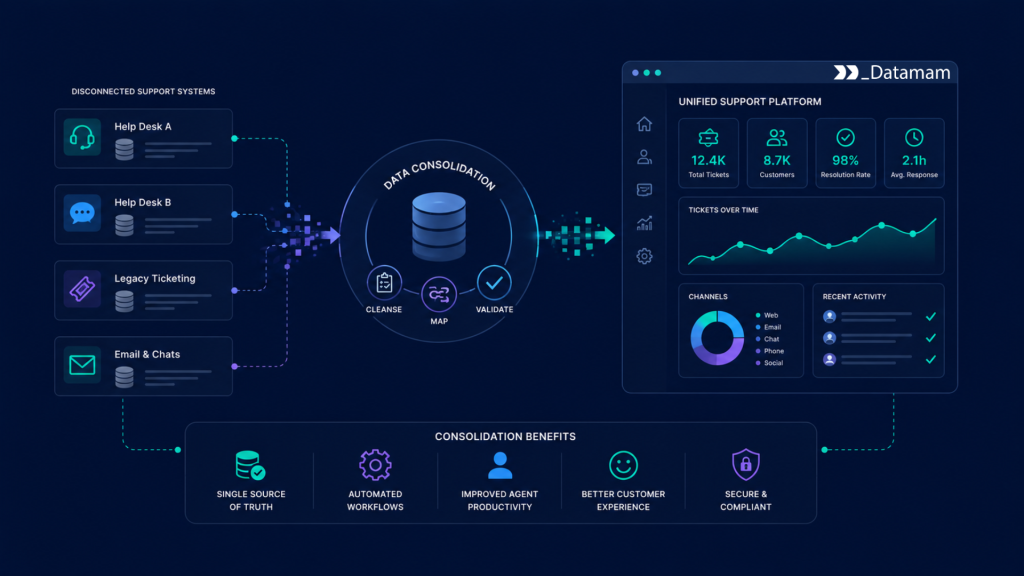
Customer support system consolidation depends on accurate data movement across legacy help desks, ticketing platforms, CRM systems, knowledge bases, live chat tools, call center applications, customer portals, SLA records, and reporting environments. When Support System Migration is poorly controlled, teams face missing ticket history, duplicate customer records, broken case ownership, incomplete escalation trails, inaccurate SLA reporting, and service agents who lose trust in the consolidated platform. The issue is rarely only the new support tool. It is usually the migration operating layer behind the consolidation: source profiling, customer identity matching, ticket mapping, validation, reconciliation, access control, lineage, and cutover governance. Support System Migration gives customer service, operations, revenue, compliance, IT, and analytics teams a structured way to move service data without weakening customer continuity.
The Migration Risk Gap in Support System Consolidation
Support system consolidation is often framed as a platform rationalization project, but the highest operating risk usually sits in service history continuity. Legacy support environments contain tickets, cases, conversations, customer records, escalation notes, SLA clocks, tags, macros, routing rules, satisfaction scores, attachments, knowledge articles, and agent ownership history. Some records may be duplicated, incomplete, archived, manually edited, or structured around old support processes.
This creates a migration risk gap. A consolidated support platform may be configured correctly while the customer service data remains unresolved. Agents need accurate case history. Managers need reliable SLA and backlog reporting. Customer success teams need visibility into escalations. Compliance teams may need audit trails for regulated support interactions. NIST Cybersecurity Framework 2.0 is relevant because support consolidation involves customer data, identity controls, access governance, monitoring, and risk management across connected enterprise systems.
Why Support Data Becomes Difficult to Move
Support data becomes difficult to move because it combines structured records and operational context. A ticket may include status, priority, channel, customer, agent, product, SLA target, attachments, internal notes, public replies, and escalation history. Legacy systems may use different status names, queue structures, tag conventions, customer identifiers, and permission rules.
During help desk migration, these differences become operational defects. A ticket may migrate without its internal notes. A customer may appear under multiple profiles. A closed case may reopen incorrectly. An escalation may lose its owner. Support System Migration reduces this risk by exposing service data issues before the consolidated system becomes the operating platform.
Where Customer Support Migration Strategy Breaks Down
Customer support migration strategy breaks down when data is treated as a final export task. Teams may configure workflows, queues, automations, and agent permissions while assuming legacy cases can be imported near cutover. In practice, migration requires early profiling, ticket ownership, field mapping, customer matching, attachment handling, test loads, validation, reconciliation, and business signoff.
Late discovery creates pressure. If open tickets fail validation near go-live, service teams may need manual workarounds. If customer identities do not merge cleanly, agents may lose relationship context. Also, if SLA history does not migrate correctly, reporting continuity breaks. At scale, support platform migration must treat service data as a core consolidation workstream.
Support System Migration as an Operating Layer
Support System Migration becomes valuable when it operates as a controlled layer between legacy support sources, transformation workflows, validation processes, and the target service platform. The goal is not simply to move tickets. The goal is to deliver accurate, reconciled, approved, and traceable customer service data into the consolidated system.
This operating layer should define which system owns each service record, which tickets are eligible for migration, which closed cases should be archived, which customer records require deduplication, and which validation checks must pass before cutover. Without these controls, service system consolidation can move old support disorder into a newer interface.
Defining Ownership Across Service Data Domains
Source ownership is the foundation of reliable customer support migration. Support operations may own ticket status, queues, routing rules, SLA rules, agent groups, and escalation workflows. Customer success may own account context, renewal risk, relationship notes, and strategic customer flags. Product teams may own defect categories, feature request tags, and product issue classifications. Compliance teams may own retention, privacy, audit, and access rules.
Clear ownership prevents migration disputes. IT can extract tickets, but support operations must approve how statuses and queues map. Customer success must confirm which customer context should remain visible to agents. Compliance must confirm which sensitive notes, attachments, or customer records require restricted handling.
Creating a Source-to-Target Support Model
A source-to-target support model connects legacy object, legacy field, target object, target field, transformation rule, owner, validation rule, load sequence, and reconciliation requirement. This model does not require every legacy field to move. However, it does require explicit decisions before support data transfer begins.
For example, a legacy “urgent” status may map to priority, escalation flag, or SLA risk in the target platform. A closed ticket may migrate as read-only history rather than an active case. A knowledge article may need metadata updates before publication. Support System Migration should make these decisions visible before mock loads.
Infrastructure Requirements for Help Desk Migration
Help desk migration depends on infrastructure that can extract, profile, transform, validate, load, reconcile, monitor, and govern records across legacy and target platforms. The objective is not to create one-time imports that only technical teams understand. Teams need repeatable migration workflows that handle schema differences, attachment references, duplicate customers, failed records, permission mapping, and audit evidence.
Support data is sensitive because it includes customer identities, service history, internal notes, account issues, product problems, attachments, and sometimes regulated information. ISO/IEC 27001 is relevant because customer service consolidation requires disciplined controls around confidentiality, access management, auditability, and risk treatment.
Profiling, Validating, and Routing Support Records
Migration data may come from legacy help desks, CRM systems, live chat platforms, call center systems, customer portals, knowledge bases, data warehouses, and spreadsheets maintained by support teams. Profiling should identify duplicate customers, missing ticket IDs, invalid statuses, unmapped queues, incomplete SLA records, missing agent references, broken attachment links, and inconsistent timestamps.
Apache Airflow can orchestrate recurring extracts, profiling jobs, validation runs, and mock load workflows. Spark can process large ticket histories, chat transcripts, activity records, and attachment metadata. dbt can manage repeatable transformation logic for ticket mapping, customer identity matching, SLA normalization, and reconciliation-ready tables.
def route_support_record(record):

    if record["migration_status"] == "validated":

        return {"action": "load_to_target_support_platform", "ticket_id": record["ticket_id"]}

    if record["migration_status"] == "failed":

        return {"action": "send_to_support_owner", "ticket_id": record["ticket_id"]}

    return {"action": "hold_for_review", "ticket_id": record["ticket_id"]}


REQUIRED_SUPPORT_FIELDS = ["ticket_id", "customer_id", "source_system", "migration_status"]


def validate_support_record(record):

    missing = [field for field in REQUIRED_SUPPORT_FIELDS if not record.get(field)]

    if missing:

        return {"valid": False, "reason": "missing_fields", "fields": missing}

    if record.get("status") == "open" and not record.get("assigned_team"):

        return {"valid": False, "reason": "assigned_team_required"}

    if record.get("has_attachment") and not record.get("attachment_reference"):

        return {"valid": False, "reason": "attachment_reference_required"}

    return {"valid": True}


record = {

    "ticket_id": "TCK-48192",

    "customer_id": "CUST-77102",

    "source_system": "legacy_helpdesk",

    "migration_status": "validated",

    "status": "open",

    "assigned_team": "tier_2_support",

    "has_attachment": True,

    "attachment_reference": "ATT-90811",

}


print(route_support_record(record))

print(validate_support_record(record))
This migration logic keeps support records controlled before target loading. Validated tickets can move into the consolidated platform, failed records can be routed to support owners, and incomplete open cases or attachment references can be blocked before they create agent workflow issues.
Normalizing Tickets, Customers, Agents, and SLA Records
Raw support data rarely aligns cleanly with the target platform. Legacy systems may use different ticket IDs, customer IDs, queue names, agent references, SLA policies, escalation statuses, case categories, product tags, and satisfaction scores. Some fields may be optional in the old system but mandatory in the new support environment.
Normalization aligns tickets, cases, contacts, accounts, agent IDs, teams, queues, priorities, SLAs, channels, tags, macros, knowledge articles, satisfaction scores, and reporting periods. Snowflake, BigQuery, or Databricks can support staging, comparison, historical preservation, and reconciliation layers during the migration process. Great Expectations can support completeness, uniqueness, accepted-value, and referential integrity checks before loading.
Validating Service Continuity Before Cutover
Validation controls prevent incomplete or incorrect records from entering the consolidated support platform. These controls should check missing ticket IDs, duplicate customers, invalid status mappings, missing owners, unresolved open cases, broken attachments, incomplete SLA fields, invalid queue assignments, and restricted-note access rules.
Validation should occur before mock migrations, user acceptance testing, and final production cutover. Without validation, support platform migration can create service defects that directly affect customers, agents, managers, and reporting teams.
Technology Stack Behind Service System Consolidation
Service system consolidation requires a technology stack that supports extraction, staging, transformation, validation, reconciliation, loading, monitoring, and governance. The stack must support repeated mock migrations before cutover, not just a single production import.
A mature environment connects legacy ticketing systems, CRM, customer success tools, call center platforms, chat systems, knowledge bases, ETL/ELT pipelines, target support APIs, BI dashboards, and audit repositories. It should reduce manual correction without weakening service governance or customer data protection.
Orchestration, Processing, and Loading
Migration workflows often use APIs, database extracts, secure files, and staging tables. Airflow can coordinate extraction schedules, dependency chains, validation jobs, load batches, and exception reports. APIs can load validated tickets, customers, organizations, agents, queues, notes, attachments, macros, and knowledge articles into the target support platform.
Processing layers convert raw service records into target-ready objects. Spark can process high-volume ticket histories, chat transcripts, call metadata, and customer records. dbt can standardize transformation logic, queue mapping, customer deduplication outputs, and reconciliation tables. The migration design should include retry logic, load sequencing, idempotency, failed-record reporting, and batch monitoring.
Governance, Lineage, and Access Control
Support migration governance should include role-based access, audit logs, metadata catalogs, data lineage, retention rules, source documentation, approval evidence, and cutover versioning. These controls matter because service data affects customer experience, compliance, SLA reporting, customer success visibility, and operational performance.
Data lineage should trace each migrated record from source extraction through profiling, mapping, transformation, validation, staging, target load, reconciliation, and approval. If a ticket appears incorrectly after cutover, teams need to determine whether the issue came from source data, status mapping, queue conversion, customer matching, permission logic, or target import behavior.
Commercial Impact of Support System Migration
The commercial value of Support System Migration appears when teams can trust the completeness, accuracy, and usability of service records after consolidation. Better migration control can reduce cutover disruption, protect customer context, improve agent productivity, lower post-migration cleanup, and support more reliable service reporting. The result is not only cleaner data transfer. It is stronger service consolidation execution.
For customer support leaders, customer success teams, operations managers, compliance teams, analytics leaders, and IT sponsors, the practical value is confidence. Integrated migration data helps teams understand which tickets are ready, which customers are deduplicated, which SLAs reconcile, and which exceptions require business decisions.
Protecting Customer Context and Agent Productivity
Support teams adopt a consolidated platform faster when tickets, customer profiles, notes, attachments, queues, and escalation history are accurate. If agents find missing context, duplicate customers, or incorrect open case status after go-live, they spend time investigating records instead of helping customers.
Support System Migration supports continuity by validating service data before cutover and preserving the context required for agent workflows. It also reduces post-cutover cleanup, which can otherwise weaken productivity during a sensitive transition period.
Supporting SLA Reporting, Customer Success, and Operations
Supporting platform migration affects more than ticket handling. Service leaders need SLA continuity, backlog history, escalation reporting, satisfaction trends, and channel performance. Customer success needs visibility into strategic account issues. Operations needs workload and staffing data. Compliance may need evidence of service activity and restricted access.
Reliable help desk migration helps these teams operate from a shared service record structure. It reduces disputes over ticket status, customer history, SLA performance, and operational reporting after consolidation. Data migration strategies for CRM systems play a crucial role in ensuring that historical customer data is preserved accurately. These strategies should include comprehensive plans for data mapping, validation, and testing to minimize disruptions. By prioritizing effective migration processes, organizations can enhance user experience and maintain seamless service delivery during transitions.
Risk Exposure When Support Migration Is Poorly Controlled
Poorly controlled support migration creates customer experience, operational, and governance risk. Open tickets may be lost. Closed cases may appear active. Customer records may duplicate. Attachments may break. SLA history may not reconcile. Agents may lack the context needed to resolve customer issues.
The risk increases when support environments include multiple help desks, acquired teams, regional queues, different service tiers, custom fields, outsourced support partners, and undocumented workflows. Manual migration methods may work for narrow datasets, but they become fragile in enterprise service system consolidation. Data migration strategies for enterprises must be meticulously planned to avoid disruptions. Ensuring a seamless transition requires comprehensive testing and validation of all data types. Companies that invest in robust migration strategies are more likely to achieve a successful integration and maintain customer satisfaction.
Ticket History and Customer Identity Defects
Ticket history defects weaken customer service continuity. A customer may contact support and find that the agent cannot see prior issues, escalation notes, or promised follow-up actions. Customer identity defects create similar problems when the same customer appears under multiple accounts or organizations.
Support migration workflows should preserve ticket IDs, customer IDs, account hierarchy, conversation history, internal notes, attachments, and source timestamps. This improves service continuity and reduces manual record investigation.
Access, Privacy, and Sensitive Service Data Risk
Support data often includes customer identities, internal notes, attachments, complaints, billing issues, security concerns, and product defects. Migration can create risk if permissions, masking rules, retention rules, or audit logs are not preserved. A restricted note in the legacy system may become visible in the target platform if access rules are not mapped correctly.
NIST SP 800-53 is useful because support migration environments often require access control, audit logging, monitoring, and security governance across sensitive customer data. Data migration strategies for finance upgrades are essential to ensure that all sensitive information is transferred securely and accurately. Implementing robust verification processes during this transition can help prevent data loss and safeguard against unauthorized access. Additionally, regular audits post-migration are crucial for maintaining compliance and identifying any lingering issues.
Evaluating Support System Migration Readiness
Support System Migration becomes valuable when it supports repeatable migration workflows, not simply when records can be exported. Readiness depends on source ownership, customer identity matching, ticket mapping, validation controls, reconciliation, access governance, mock cutover results, and exception handling.
A readiness review helps identify where migration risk accumulates before it becomes a go-live delay, service disruption, SLA reporting issue, customer complaint, or compliance concern.
How Teams Assess Support Migration Data Quality
A structured assessment should evaluate duplicate customers, missing ticket IDs, unresolved open cases, invalid status mappings, broken attachment references, incomplete SLA fields, missing agent owners, unmapped queues, inconsistent timestamps, and source-to-target mapping coverage. It should also review ownership, validation coverage, exception volume, reconciliation results, access controls, and lineage completeness.
For customer support migration, quality must be evaluated operationally. A record may load successfully while still failing to support agent workflow, customer continuity, SLA reporting, or compliance review.
When Organizations Need a Support Migration Architecture Review
A support migration architecture review becomes useful when teams rely on manual exports, incomplete mapping files, inconsistent ticket records, failed mock loads, or reports that do not reconcile after test migration. The review should assess source coverage, migration workflows, ticket and customer transformation logic, validation controls, staging architecture, lineage tracking, governance posture, attachment handling, and cutover execution.
The output should clarify where support migration risk accumulates, where customer support migration may be incomplete, and which infrastructure improvements would make support platform migration more reliable for service, operations, customer success, compliance, and IT teams.
Conclusion: Support System Migration as Service Consolidation Infrastructure
Customer support system consolidation depends on reliable data movement across legacy help desks, CRM systems, customer portals, call center applications, chat platforms, knowledge bases, reporting tools, and target service platforms. When migration is inconsistent, teams spend excessive time correcting tickets, restoring customer context, investigating SLA gaps, and rebuilding agent confidence after cutover. Support System Migration creates the governed foundation needed to coordinate service system consolidation across the full transition lifecycle.
Ultimately, organizations that treat support migration as service consolidation infrastructure, not just help desk data transfer activity, will be better positioned to protect customer context, improve customer support migration, reduce cutover risk, and build more reliable support platform migration outcomes across service operations.